






Download the free Rental Tracker app
Download the free Rental Tracker app from the App Store or Google Play.
The app gives you access to the dashboard and the digital installation form. This allows you to easily register each tracker during installation. You can find more information about the app at the app page.
Always use the installation form, even when transferring a tracker to another vehicle or piece of equipment. This ensures your records remain up to date and enables us to provide you with prompt support in the event of queries, faults or emergencies.
Installation of the tracker
The Wired Tracker is a wired tracker for vehicles and equipment with its own 6–30-volt power supply.
The tracker is professionally fitted by a fitter or garage and comes with an installation kit. You can also install the tracker yourself using the colour-coded guide in the Rental Tracker app.
You can easily install the Relay Tracker yourself, saving both time and money. Using the cable supplied, connect the tracker directly to the battery (10–40 volts) via the positive (red) and negative (black) terminals.
Would you like to use a start block? If so, connect the Relay Tracker to our Quicklock system. Please refer to the Quick Start Guide.
The OBD Connect 4G Tracker connects directly to the vehicle’s OBD port. Thanks to its plug-and-play installation, the tracker is ready for use within seconds and can be easily transferred to another vehicle.
Would you like to keep the OBD port available for diagnostic equipment? If so, an optional Y-cable provides the solution. An extension cable is also available for a neat and concealed finish.
We activate the Stealth Elite Tracker online before delivery.
Position the tracker carefully and discreetly. Correct positioning ensures optimum GPS and network reception, as well as maximum battery life.
Always use the digital installation form, even when transferring the tracker to another vehicle or piece of equipment.
Please refer to the Quick Start Guide.
If you don’t have the right expertise, or if you’d prefer to outsource this work, we’d be happy to put you in touch with one of our trusted installation partners.
Register your tracker
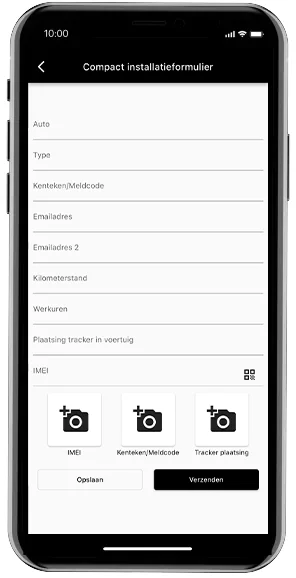
Register each tracker using the digital installation form in the Rental Tracker app.
You can choose from:
For quick registration of your own vehicle fleet.
For a complete installation record, including details of the fitter, the customer and any immobiliser.
The confirmation
Once you have submitted the form, you will automatically receive a confirmation email containing all the installation details on file.
Is there a temporary loss of internet connection? If so, the form will be securely saved and automatically sent as soon as the connection is restored.
Activating the tracker
Your tracker is already linked to your account before delivery. As soon as the tracker connects for the first time, it is automatically activated and appears in the Rental Tracker portal. You can find the tracker under the ‘Items’ tab using its unique IMEI number. As soon as the tracker is powered up and starts transmitting data, its status automatically changes to ‘Active’.
Understanding the portal
Log in via the Rental Tracker portal or the Rental Tracker app.
We recommend that you first read this instructional videos to have a look at so you can get off to a flying start!
To use the portal, all you need to do is log in via your browser or the Rental Tracker App. We recommend that you watch these instructional videos first so that you can get off to a flying start. There are instructions on how to change the tracker name, generate reports, change your password, etc.
Do you have any questions or need any help?
Do you have any further questions, or would you prefer not to install the tracker yourself? We’d be happy to help you or put you in touch with one of our authorised installation partners.
Our support team is available every working day from 8.00 am to 8.00 pm:
 Dutch
Dutch  English
  German
  Italian
  Spanish
  Danish